Creating a clickable link or URL
You can add a clickable link in your PDF using either the Text component or the HTML component. Both components accept standard HTML <a> tags, so the generated PDF will contain a working hyperlink.
Option 1: Simple text link with the Text component
Use a plain <a> tag inside the Text component to turn a piece of text into a clickable link:
<a href="http://google.com">This is a link</a>
Option 2: Button-style link with the HTML component
If you want the link to look like a button, use the HTML component and style the anchor tag with inline CSS:
<div style="text-align:center;">
  <a href="http://google.com" style="
    display:inline-block;
    background: lightgray;
    border-radius: 5px;
    padding: 12px 24px;
    text-decoration: none;
    color: black;
    text-align: center;
    ">
    click me
  </a>
</div>
The following screenshot shows both options in the editor:
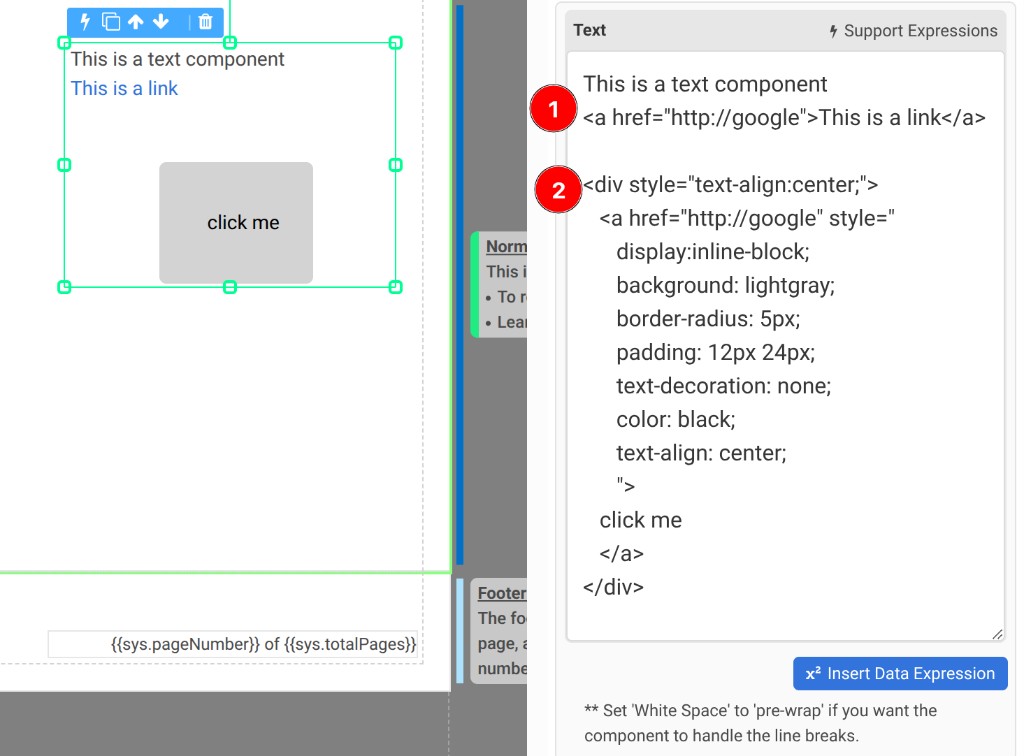
tip
If the link text does not wrap correctly or the line breaks are ignored, set the White Space property of the Text component to pre-wrap.